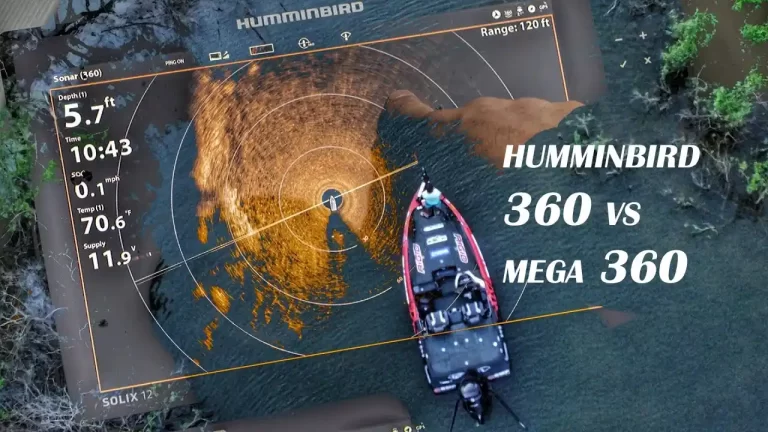
Review of the Humminbird Bow 360
I’m certain that the Humminbird Bow 360 system is the most underappreciated piece of fishing gear available after using it for more than three years. Sincerely, there is nothing I would trade it for. Smaller screens with a 360 are preferable over larger panels without one.
With hundreds of 360-degree hours under my belt, I am well-qualified to address the many advantages and drawbacks of this ground-breaking sonar (pun intended). You’ll learn exactly why and how I utilize the Humminbird Bow 360 to become a better and more productive angler in this review.
What it Does
In essence, 360 Imaging is a revolving side imaging transducer. Unlike Side Imaging, which makes the image by scrolling from top to bottom, 360 “scrolls” in a circle to create an image of the water column surrounding the boat.
Several sonar imaging crystals revolving in an oil bath are housed inside the transducer pod. The software paints the circular sweep onto the screen as an image after the rotation makes it. You will instantly recognize how similar it is if you are familiar with side imaging.

Installation and Materials
- A Humminbird 360 Bow mount system is really simple to install. Three parts make up the complete system. There is a GPS direction sensor, a mounting bracket, and a transducer pod mounted on a shaft.
- The trolling motor is connected to the composite shaft that the transducer pod is fastened to by way of a locking bracket on an aluminum bracket. To align with the boat’s centerline, the teardrop collar above the pod must face directly forward. The pod needs to be a few inches above the trolling motor casing, just enough for the prop to clear.
- Two wires emerge from the shaft: one for electricity, the other for Ethernet. Be careful when arranging the wires along the trolling motor; there needs to be room for the motor to extend and retract.
- The location of the waypoints on the 360-degree sweep view is determined by the GPS heading sensor. Connect the GPS puck to the bow fish finder after mounting it near the 360 pods.
- Once the GPS puck and pod are in the proper locations and the cables have been routed, you may link it to your network or fish finder. Either the 5 Port Ethernet Switch or the device can receive the 360 directly. A networked system is ideal if you fish with a partner because you can both observe the 360-degree sweep.

Advantages of Bow 360
View All Around the Boat: The ability to observe the lake bottom and water column in all directions surrounding the boat is Bow 360’s most evident advantage. Even better, it functions best when you remain still or move gently, just like you would when using a trolling motor. After using a Bow 360 for some time, fishing without one will feel like fishing in the dark.
360 on the Bow and 360 Navigation with waypoints, you may approach the structure cautiously without having to drive over it or toss out a flagged buoy, which could frighten fish.
Line up Every Cast: Every cast should be lined up since 360 imaging makes every cast fruitful. You don’t need to use your bait to scout for the rock pile, grass line, or brush pile. Every cast can be lined perfectly, and your bait may be dropped right into the production areas where fish congregate.
Follow Transition Lines: On the 360-degree sweep, points, ledges, humps, and reefs will all show a characteristic color change. Typically, this consists of a firmer bottom and rising terrain, similar to what you would see on side imaging. It is quite easy to tell in 360 whether you are in a suitable throwing stance for the structure you are fishing.
See the Grass Line: Using a 360 to fish grass lines that are submerged is wonderful. You can see the weed and grass line surrounding the boat just as clearly as you can see variations in hardness. Without ever driving over the grass beds, turns, points, and holes in the grass become apparent.
Reveal Irregularities: The discoveries I make when merely fishing along the bank or ledge never cease to astound me. Without 360, I never would have known there were rock piles, bream beds, shell beds, or undergrowth in the area.
Follow Bait and Schools of Fish: Bait balls have appeared on the 360 sweep multiple times, and their motions can be followed with each refresh. Fish following the bait can be seen in open water. By keeping an eye out for the distinctive white lines that appear and fade, you may also observe fish moving literally inside and around brush piles.
See Beds: On 360 Imaging, bream beds (and the fish in them) are very visible. You can use Side Imaging to mark them before approaching and fishing them with the 360. In numerous instances, I’ve come across haphazard bream colonies in beds along the bank or on enormous flats. From spring through summer, these locations are consistently favorable for finding largemouth bass. The beds of spotted bass are adjacent to the brush piles in the picture below.
Restrictions of the Bow 360
- Motor Compatibility – Minn Kota trolling motors with foot controls work best with the Bow 360. There are no accessories that are officially compatible with the electric steer/electric trim motors on the Terrova and Ulterra. To use 360 with such motors, you can purchase aftermarket items like the Cumberland Crappie mount. A unique adaptor is required for the bracket to fit motor shafts with Motor Guide motors.
- Bow 360’s operating frequency – is 455 kHz, which is the same as standard Side and Down Imaging. You’ll see that screenshots lack the clarity and sharpness of down or side imaging. The 360 presents a little wedge on the screen instead of thin, straight lines like standard imaging does. The narrower the pie slice shape, the greater the likelihood of blurring the distance from the sweep’s center. This shouldn’t discourage you because the imaging is detailed and informative.
- Not “Live”: The 360 degree sweep shows you history, much like side imaging. Every time the screen is painted over, you will see that the schools of bait and fish have migrated a little.
- Side by Side 2D Limits: For some unknown technical reason, the 2D sonar operates substantially slower when the split screen with 360, rendering it essentially useless. Since they operate on the same frequency, Down Imaging will not at all split screen. Running a separate tiny secondary unit is advised if you discover that the 360 sweeps are being accompanied by 2D sonar or down imaging.
- Less Helpful in Deep Water: 360 Imaging is most effective in water that is no deeper than 20 feet, although it is still useful in open water and in water that is much deeper.
- Not as Useful in Large Vegetation: Bow 360 is less effective in dense vegetation since it struggles to cut through thick mats of grass. As you might expect, the foliage hinders the 360-degree sweep and can entangle the pod shaft. Different rules apply to subsurface grass; the pod may “see” through the tops to reveal holes and cuts in the grass bed.
Panoptix vs 360
The Humminbird 360 is most frequently contrasted with the Garmin Panoptix. In my perspective, the analogy is absurd because the two sonar technologies are entirely unrelated. Since they are the two most often used forward-looking sonar systems, it is helpful to talk about which one you want to purchase.
- 360 Imaging: A hands-free continuous imaging sweep that constantly updates the image for the location you specify (complete circle or a sector).
- Fishing Shallow: When fishing shallow, you frequently make a lot of casts to particular targets and places. It simply doesn’t make sense to spend that much time aligning the transducer to produce a cast because Panoptix must be lined up with your target to function.
- 360 Imaging: On the other side, shallow water is where 360 Imaging shines. You can hit every visible target plus anything you can’t see that is revealed by the 360 if you just let the 360 sweeps, whether you’re flipping and pitching or casting and cranking. Wood, grass, and pebbles are immediately visible, and all you need to do is cast to them as you move.
- Grass Fishing: which I previously mentioned, offer continually changing views of the grass all around you when you are grass fishing. With the help of this knowledge, you may make accurate casts along edges, pitch into holes, and spot turns, points, and solitary clusters where large fish like to congregate.
- Versatility: Bow 360 Since I have only used the Bow 360, I am undoubtedly partial, but I have made an effort to conduct in-depth research and provide an unbiased comparison here. Although Panoptix has its uses, in my opinion, 360 is a more adaptable tool for freshwater fishing.
- Panoptix: “live” 2D sonar that is forward-looking. Live simply implies that the sonar is continuously updated rather than scrolling across the screen. Must be directed toward your castings.
- Fishing for Deep: Targeting specific bits of structure in deeper water is where Panoptix performs best. With Panoptix, it was possible to fish quite successfully around obstructions such as rock piles, brush piles, humps, and points. The transducer’s requirement to face the structure is the biggest downside. To help align your castings, you can manually sweep the transducer. An excellent illustration of how this might function for you is this forum post.
- Fishing vertically: Drop shotting would be the most obvious application. If you have a Panoptix transducer that faces downward, it will give you live sonar returns of your rig, fish inside the cone, and how they are reacting to the lure. The fact is, as evidenced by the expert bass tours, you can already achieve this with 2D sonar on a fast scroll. The sole distinction is that Panoptix is a “live view,” whereas 2D scrolls across the screen.
- Panoptix in ultra with clear water: Garmin makes a big deal out of the fact that it can display fish following your lure. On the water, it’s unclear how frequently this scenario would occur. The best conditions would probably be in clear waters where fish can see and follow your offering. In smallmouth and spotted bass fisheries, it might be effective.
Bow 360 costs the same as a PS21 Panoptix transducer, the most popular type used with trolling motors, according to the MSRP. You need a compatible device that can display the sonar for both systems.
Conclusion: Is a Humminbird Bow 360 Right for You?
Although the Humminbird 360 bow mount reviews is an expensive accessory, it has been well worth the cost. If you are seriously considering getting it but are still on the fence, the best you could do is spend an afternoon in the boat of someone who already has it. You will quickly realize the value of Humminbird 360 imaging bow mount if you are familiar with side and down imaging.
Casts or marker buoy searches to find the structure don’t take very long. Making accurate casts every time is made possible by knowing what and where was in front of me. I would feel completely blind without a Bow 360 now that it has changed the way I fish.